
Reaching statistical significance is important in your dataset because it enables you to draw accurate conclusions. To reach it there are going to be minimum N values you will need to achieve in fielding the survey. Those minimum values are the goal line for panels to reach when sending out the survey.
We accomplish minimum quotas in IncQuery by setting caps on people who DO NOT qualify for the quota we're attempting to fill. Let's walk through an example. Here we have a quota:
 |
The minimum N we need for Full-time workers is 30N. Imagine that we are partway through fielding, but we have only reached 4N for the quota "Full-time workers". To boost the N for this group, we can cap all other roles. Creating a new quota that will count those who are NOT full-time workers, then capping that new quota, will result in only full-time workers being able to qualify for the survey.
Here's what that would look like on the Results tab:
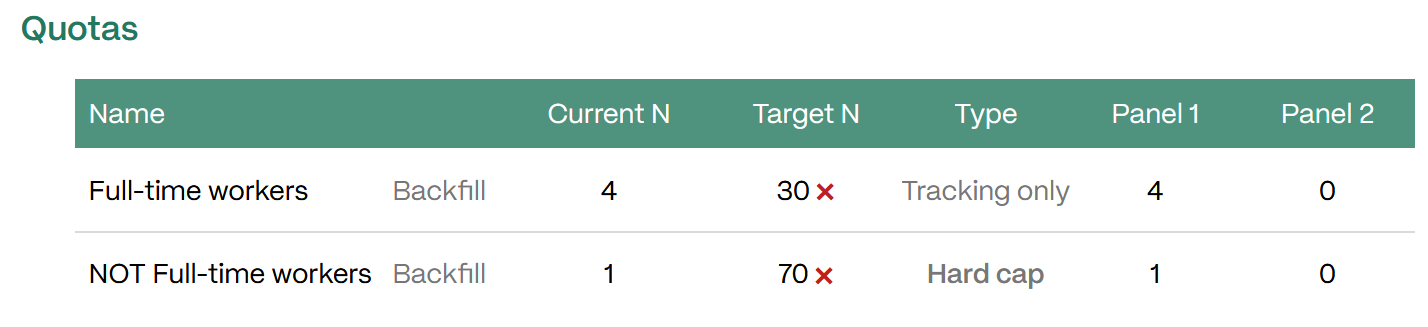 |
Once this cap is in place, the panels can send out invites to the survey, but only those who are full-time workers will be permitted to qualify.
When quotas are based on multi-select questions there’s a bit more complexity to consider. We cover that in this article: Quota Considerations
Ask your IncQuery Survey Directors for assistance in setting up minimum quotas